Contents
- 1 Quick answer
- 2 How to deposit on IQ Option in South Africa, step by step
- 3 All deposit methods in South Africa
- 4 Depositing with a bank card in South Africa
- 5 Depositing with crypto from South Africa
- 6 Withdrawing from IQ Option in South Africa
- 7 If your deposit has not arrived
- 8 Deposit guides for other countries
- 9 Frequently Asked Questions
- 10 GENERAL RISK WARNING
Last updated: 4 October 2026. Every screenshot below was recorded that day on an IQ Option Practice account registered in South Africa, over a South African connection. We stopped before the final payment button, so no money was sent.
To deposit on IQ Option from South Africa, you open the cashier, choose your bank (FNB, ABSA, Standard, Nedbank or Investec), set rand (ZAR) as your account currency, enter at least R180 and confirm. The bank method we opened asked for no other details. This guide shows each step with FNB on the South African cashier. It then covers card deposits, the official minimums and how withdrawals to South African banks work.
Quick answer
- Minimum: R180 for every method, or $10, €10 or £10.
- Fee: 0% from IQ Option on every method.
- Time: every method was listed as instant, including the banks (FNB, ABSA, Standard, Nedbank, Investec).
- Limits we saw: FNB R180–500,000; Mastercard R180–192,000.
- Currency: ZAR, USD, EUR or GBP, chosen before your first deposit and fixed after it.
- Withdrawals: one free per month, then 2% (at most R450); to 6 South African banks from R167, in 1–3 business days.
How to deposit on IQ Option in South Africa, step by step
We followed the steps with FNB. The numbers in each screenshot show where to click, in order.
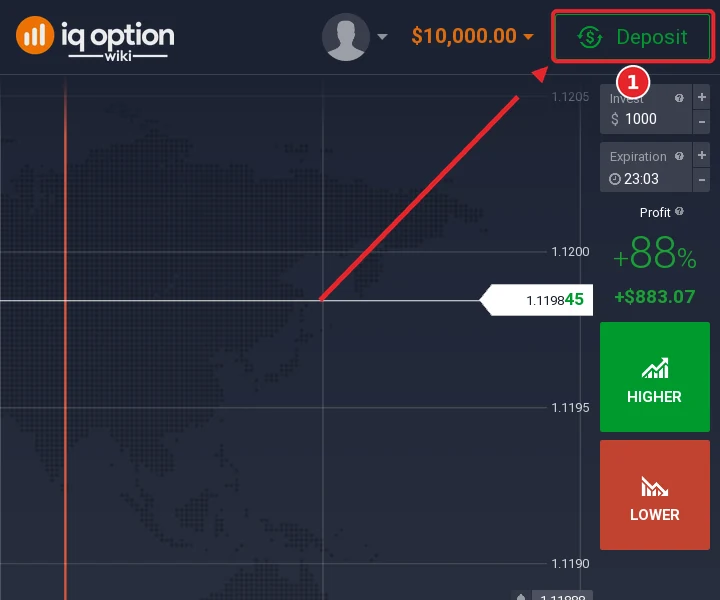
Step 1: Click Deposit
In the traderoom, click the green Deposit button at the top right, next to your balance (1).
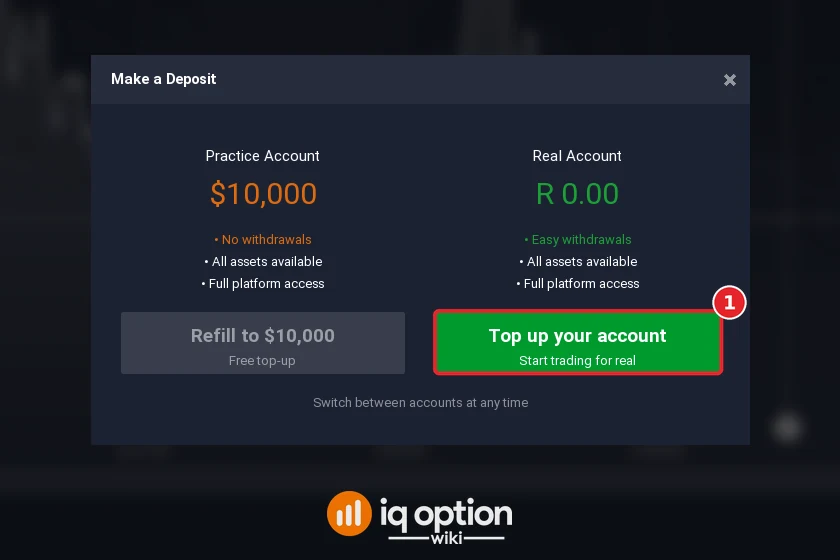
Step 2: Choose “Top up your account”
The Make a Deposit window shows your free Practice balance ($10,000) and your real account, which on a South African account is in rand (R 0.00). Refill to $10,000 only refills the Practice account with virtual money, which cannot be withdrawn. To deposit real money, click Top up your account (1).
Step 3: Choose your bank
The South African cashier recommends Mastercard, Visa and Apple Pay. Below them it lists seven cryptocurrencies and the banks: FNB, ABSA, Standard, Nedbank and Investec, all listed as instant, plus Google Pay and Volet.com. Scroll down and click your bank, here FNB (1).
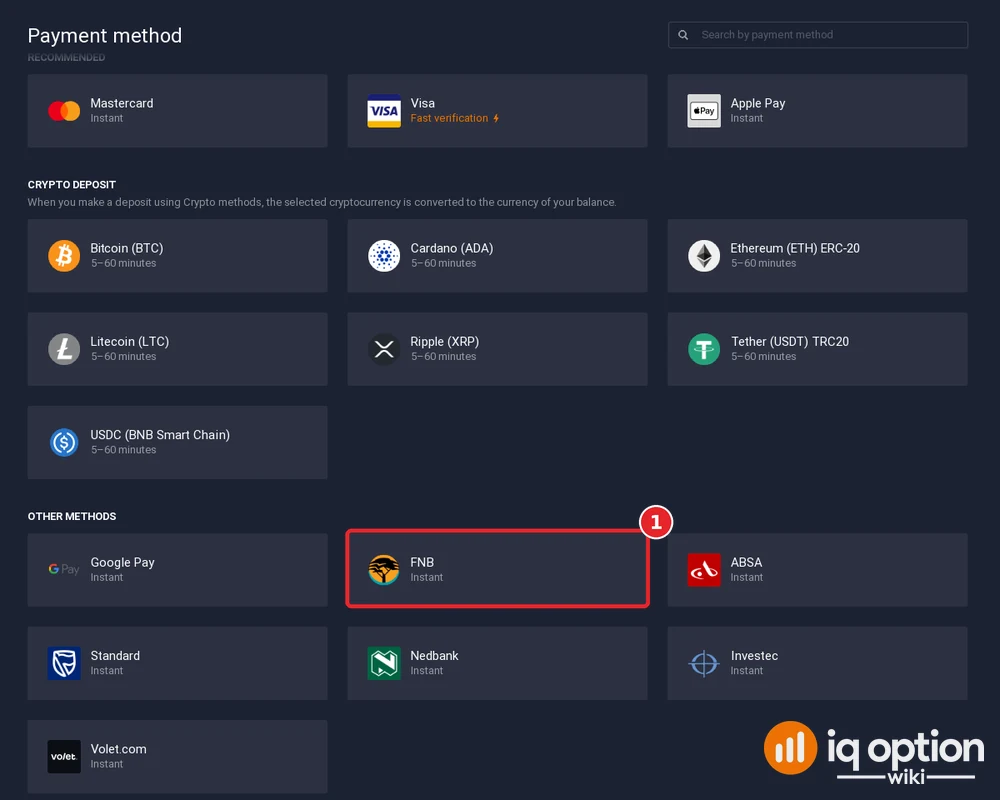
Step 4: Choose rand (ZAR) as your account currency
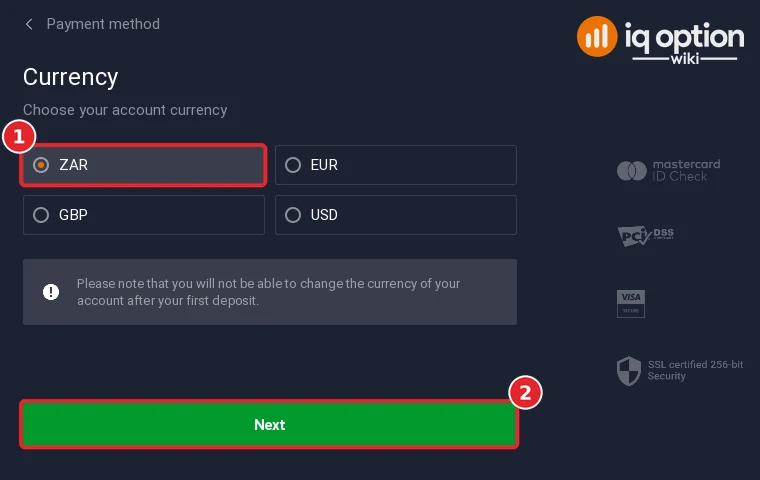
Before your first deposit, the cashier asks for the currency of your real account. A South African account can choose ZAR, EUR, GBP or USD. Select ZAR (1) and click Next (2). IQ Option warns that you cannot change the currency after your first deposit. If you pay and withdraw in rand, ZAR keeps your balance in rand.
Step 5: Enter the amount and check the bonus
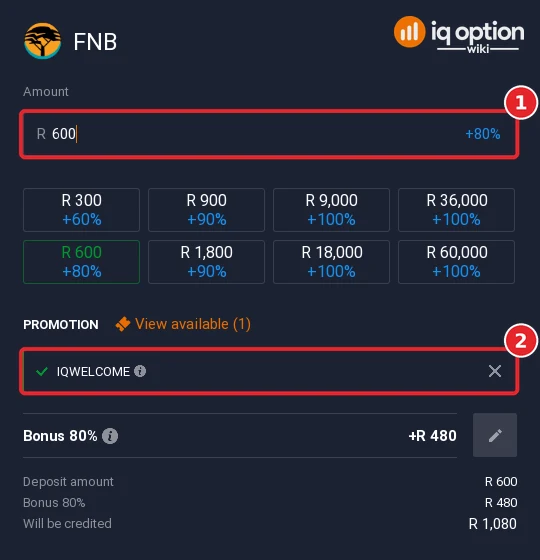
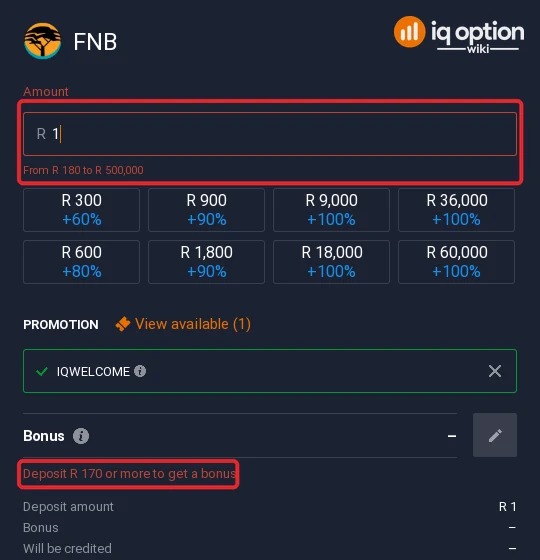
Type the amount (1) or click one of the quick amounts. FNB accepted R180 to R500,000 on our account; the field started at R600, and anything outside the range is marked in red.
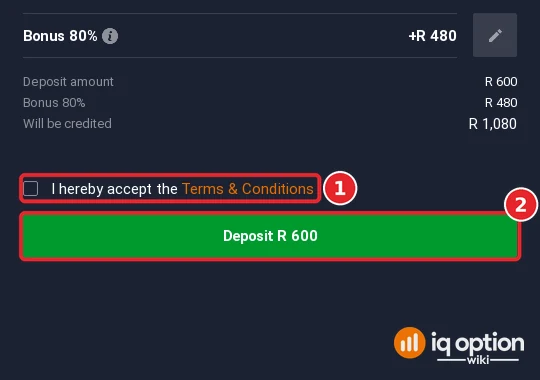
The welcome-bonus code IQWELCOME was already applied (2). On R600 it added 80% (R480), the bonus starts at R170, and the quick amounts showed up to +100% from R9,000. If you do not want a bonus, remove the code with the × before you pay, and read the bonus terms behind the (i) icon first.
Step 6: Accept the terms and confirm
FNB asked for no payment details on our account. Tick the box to accept the terms (1) and click the green Deposit button, which shows the amount (2). We stopped at this screen and did not pay. The cashier lists FNB as instant.
All deposit methods in South Africa
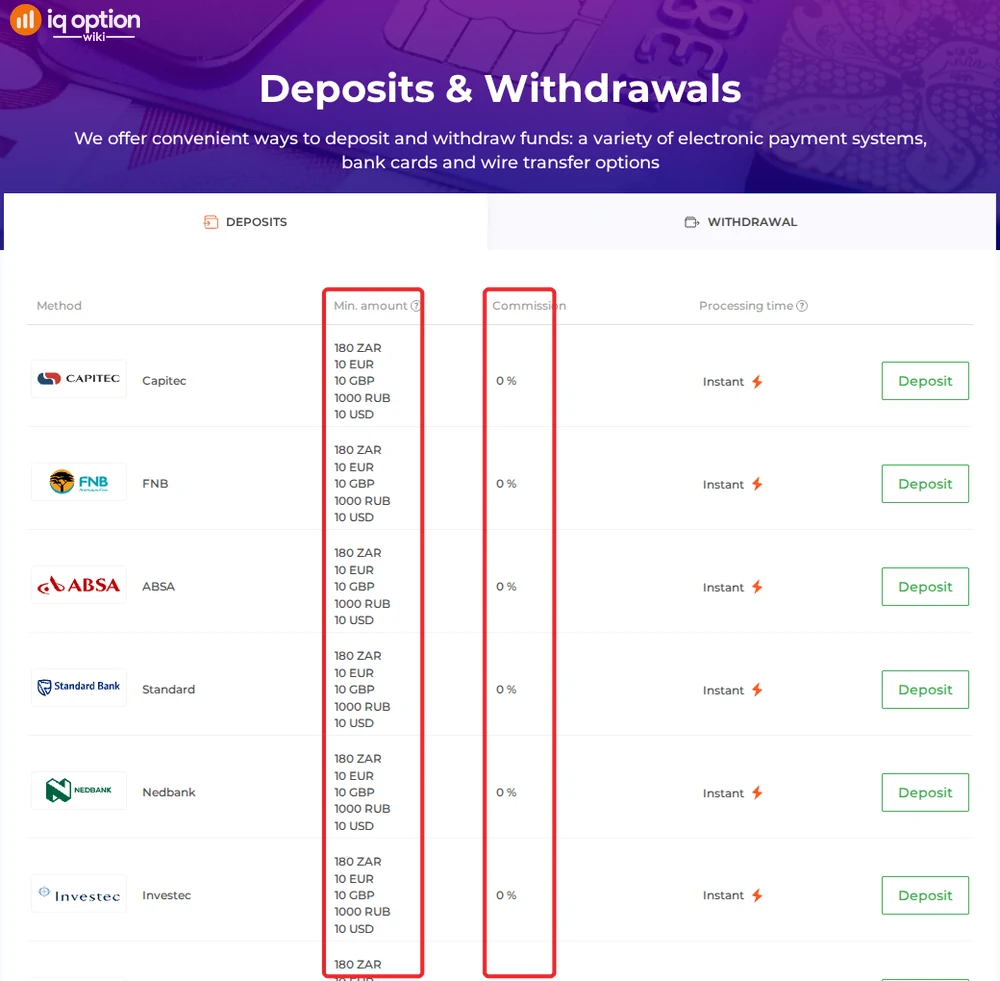
These are the methods we saw on our South African account on 4 October 2026. All of them, except Visa, were listed as instant. IQ Option’s deposits page lists the same minimum for all of them: R180, or $10, €10 or £10.
| Method | Time shown in the cashier | Notes |
|---|---|---|
| FNB | Instant | R180 to R500,000; no details asked |
| ABSA, Standard, Nedbank, Investec | Instant | |
| Mastercard | Instant | R180 to R192,000 |
| Visa | “Fast verification” | |
| Apple Pay, Google Pay, Volet.com | Instant | |
| 7 cryptocurrencies | 5–60 minutes | Converted to your account currency |
The deposits page also lists Capitec and Neteller, which did not appear in the cashier of our account. Every method on the page has 0% commission. PayGuru and AstroPay, which older guides mention for South Africa, were not in either list.
Depositing with a bank card in South Africa
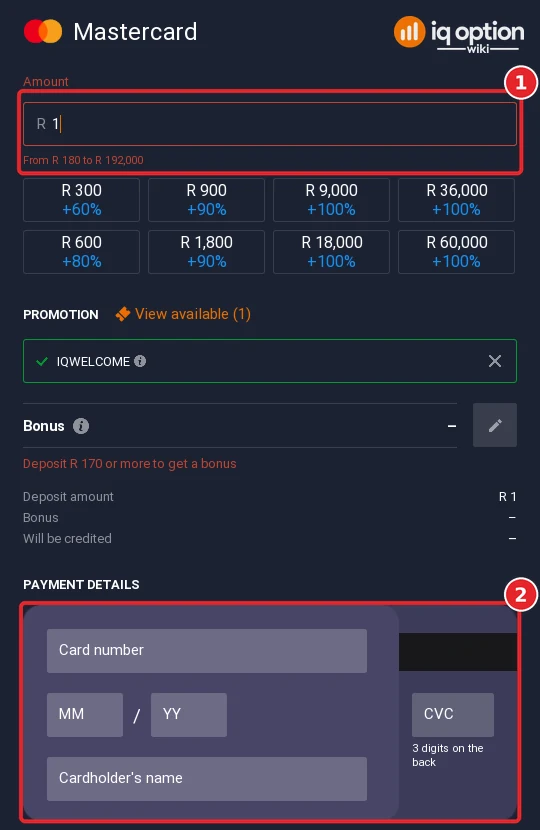
Mastercard and Visa are at the top of the South African cashier. Choose your card, set the currency and enter the amount: the Mastercard form accepted R180 to R192,000 (1). Then enter the card number, the expiry date (MM/YY), the cardholder’s name and the CVC, the three digits on the back of the card (2). Accept the terms and confirm the deposit. Use a card in your own name.
Depositing with crypto from South Africa
The South African cashier listed the same seven coins we saw in other countries: Bitcoin, Cardano, Ethereum (ERC-20), Litecoin, XRP, Tether (USDT, TRC20) and USDC (BNB Smart Chain), each at 5 to 60 minutes. IQ Option converts the coins to your account currency, so you do not hold crypto on the platform. See does IQ Option accept crypto for the full steps.
Withdrawing from IQ Option in South Africa
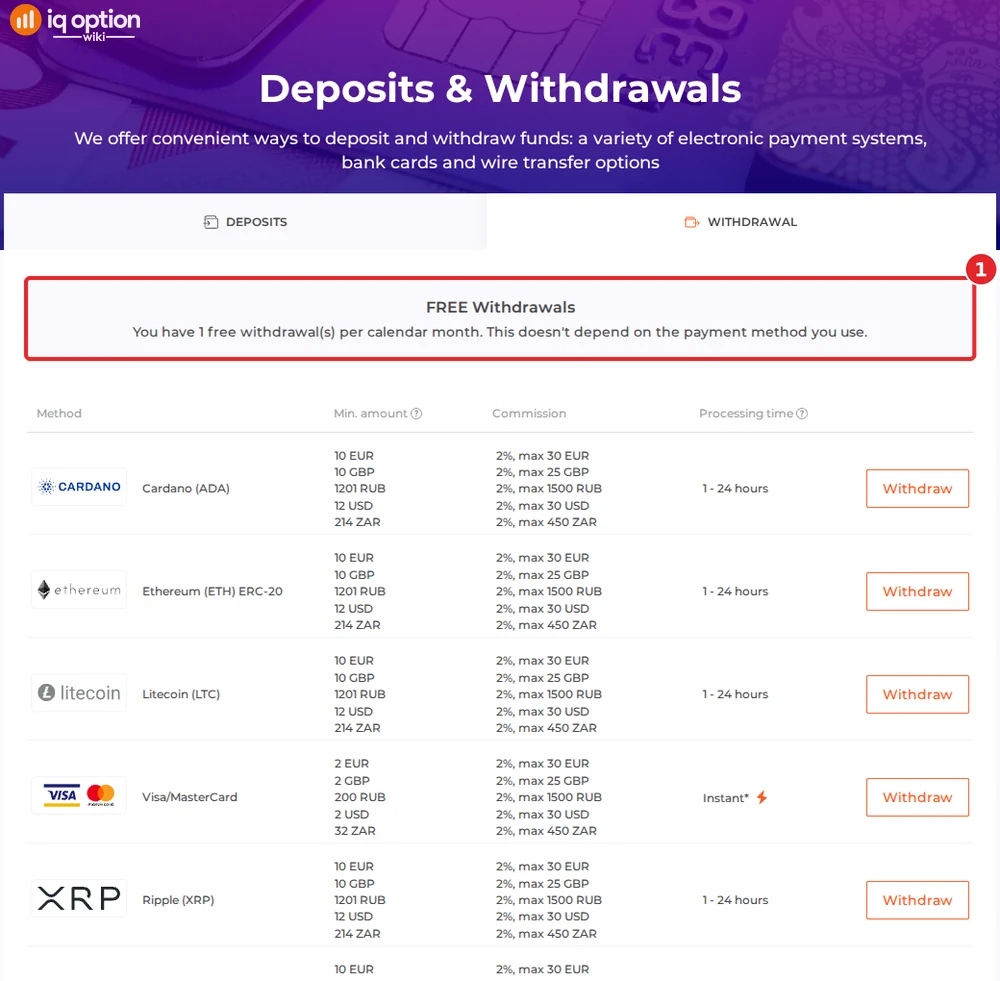
IQ Option’s withdrawals page for a South African account gives you one free withdrawal per calendar month, whatever the method (1). After that, IQ Option charges 2%, at most R450 (or $30, €30 or £25).
- South African banks: from R167, in 1 to 3 business days. The page lists Capitec, ABSA, FNB, Investec, Nedbank and Standard.
- Cards: from R32. The page notes that your bank can take up to 21 calendar days to process a card withdrawal.
- E-wallets: Volet.com and WebMoney from R32.
- Crypto: six coins from R214. Bitcoin was not in the withdrawal list.
The page also asks you to allow up to 3 business days for a withdrawal request to be processed. Read how to withdraw from IQ Option for the steps.
If your deposit has not arrived
- Check the payer. Pay from a bank account or card in your own name.
- Check your bank. The bank methods are listed as instant; if the payment left your account and nothing arrived, keep the bank reference.
- Contact support. Use the chat inside the platform (Chats & Support in the left sidebar) or email support@iqoption.com. See our support guide.
Deposit guides for other countries
The methods depend on the country your account is registered in. Our other step-by-step deposit guides, recorded the same way:
- Brazil: PIX, PicPay, Boleto, cards
- Mexico: SPEI, OXXO, cards
- Peru: Yape, Plin, BCP
- Chile: WebPay, Mach, Khipu
- Colombia: Nequi, PSE, Efecty
- Argentina: Mercado Pago QR, MODO, Rapi Pago
- Thailand: Kasikorn, SCB, Krungthai QR
- Vietnam: Vietcombank QR, BIDV, VietQR
- Nigeria: Bank transfer, OPay, PalmPay
- Philippines: GCash, Maya, QRPH
- Malaysia: Maybank, CIMB, DuitNow QR
- United Arab Emirates: Card, Apple Pay, USDT
The IQ Option deposit guide explains the general steps.
Frequently Asked Questions
Q: What is the minimum deposit on IQ Option in South Africa?
A: R180, or $10, €10 or £10, for every method. That is what IQ Option’s deposits page showed for a South African account on 4 October 2026.
Q: Can I deposit on IQ Option with FNB, ABSA or Standard Bank?
A: Yes. The cashier listed FNB, ABSA, Standard, Nedbank and Investec, all as instant. FNB accepted R180 to R500,000 and asked for no extra details.
Q: How do I withdraw from IQ Option to a South African bank?
A: Bank withdrawals start at R167 and take 1 to 3 business days, to Capitec, ABSA, FNB, Investec, Nedbank or Standard. One withdrawal per calendar month is free; after that IQ Option charges 2%, at most R450.
Q: Does IQ Option charge a deposit fee in South Africa?
A: No. Every method on IQ Option’s deposits page showed 0% commission. Your bank may charge its own fees.
Q: Which account currency should I choose?
A: A South African account can choose ZAR, USD, EUR or GBP. The choice is fixed after your first deposit. If you pay and withdraw in rand, ZAR avoids converting your balance.
Q: Do I have to take the welcome bonus?
A: No. The code IQWELCOME was pre-applied. Remove it with the × in the amount step if you do not want it.