Contents
- 1 IQ Option withdrawals from Brazil: the official conditions (checked 4 October 2026)
- 2 Introduction
- 3 Quick Reference
- 4 Step 1: Access the Withdrawal Section
- 5 Step 2: Desktop vs. Mobile Differences
- 6 Step 3: Choose Your Withdrawal Method
- 7 Step 4: Fill Out Your Withdrawal Details
- 8 Step 5: Understand Fees and Limits
- 9 Step 6: Complete the Withdrawal
- 10 Tips for a Smooth Withdrawal
- 11 Conclusion
- 12 Frequently Asked Questions
- 13 GENERAL RISK WARNING
Last updated: 4 October 2026. Amounts and fees were re-checked that day from an account registered in Brazil; the step-by-step screenshots are from our November 2024 test.
Key Takeaways
| –Bank withdrawals in Brazil ask for your CPF, bank account, agency and PIX key in one form. |
| –The first withdrawal each calendar month is free; after that IQ Option charges 2%, at most R$125. Bank withdrawals start at R$60 (official table, October 2026). |
| –Desktop version offers more withdrawal options than mobile. |
IQ Option withdrawals from Brazil: the official conditions (checked 4 October 2026)
We opened IQ Option’s deposits and withdrawals page on 4 October 2026 from a new Practice account registered in Brazil. The withdrawal table lists these conditions for Brazilian accounts:
- Free withdrawals: one per calendar month, whatever the method. After that each withdrawal costs 2%, at most R$125.
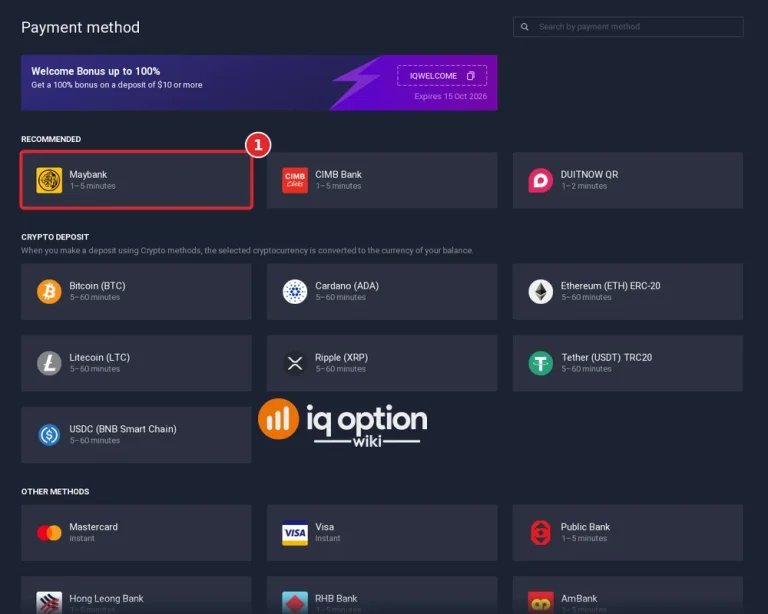
- Brazilian banks (18): among them Banco do Brasil, Bradesco, Caixa, Itaú, Santander, Inter, C6 Bank, Sicredi and Banrisul. Minimum R$60. Processing takes 1–24 hours at most banks and 1–8 business days at Citibank, BNDES, Banco Original, Safra, BMP Money Plus, Credit Suisse Hedging-Griffo and Votorantim.
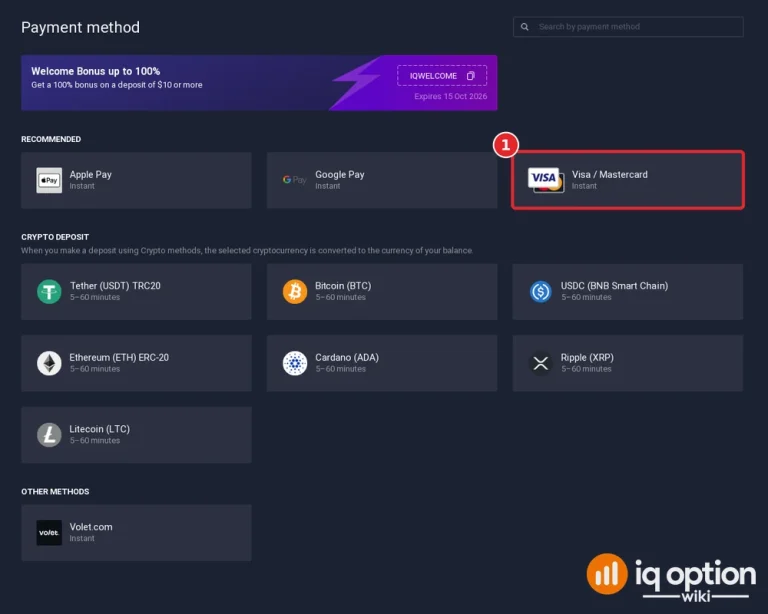
- Visa or Mastercard: from R$12, sent instantly, but the bank that issued your card can take up to 21 calendar days to credit it.
- E-wallets: Skrill and Volet.com from R$12, Neteller from R$69, 1–24 hours.
- Crypto: USDT (TRC20), USDC (BNB Smart Chain), Ethereum (ERC-20), Cardano, XRP and Litecoin, from R$72, 1–24 hours.
- Overall: IQ Option asks you to allow up to 3 business days for a withdrawal request to be processed, and warns that some withdrawals take longer.
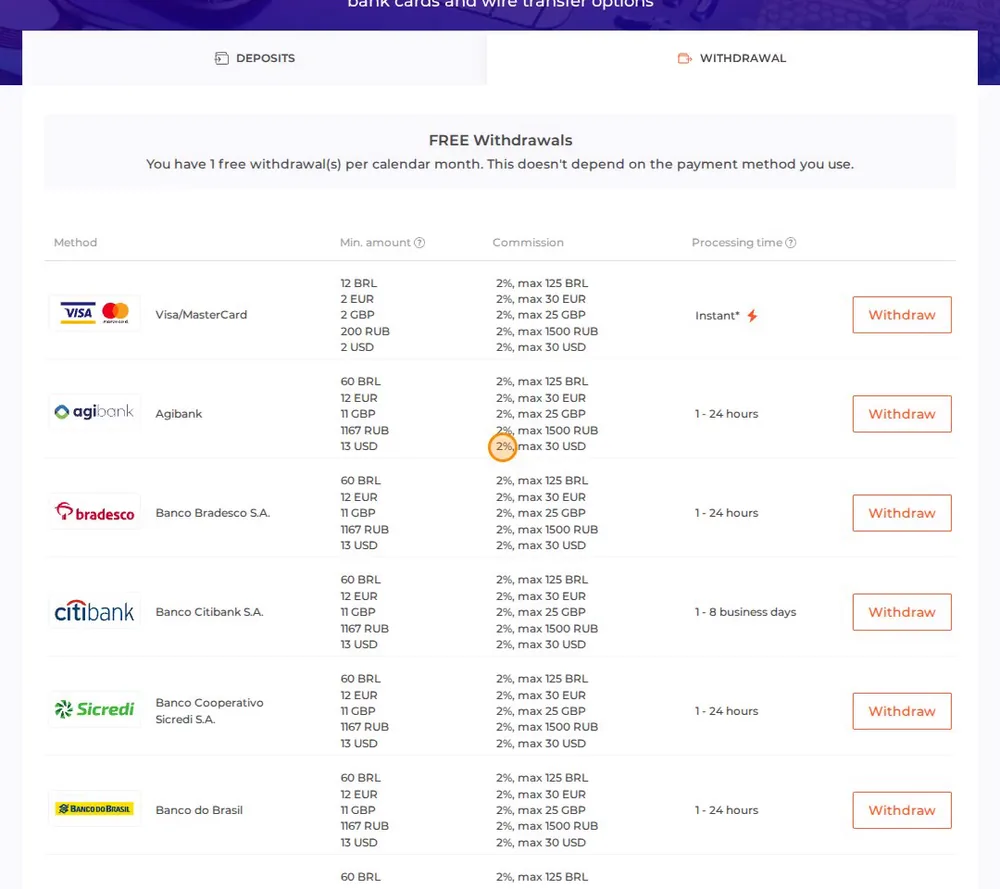
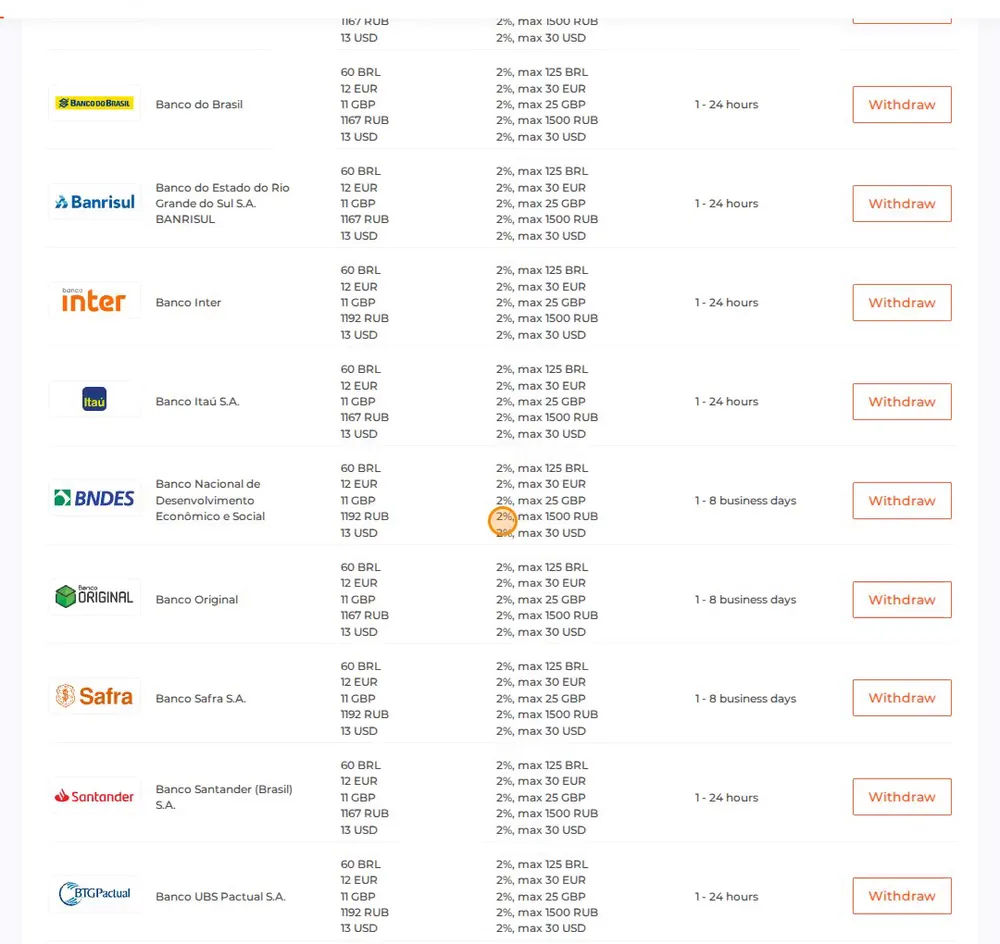
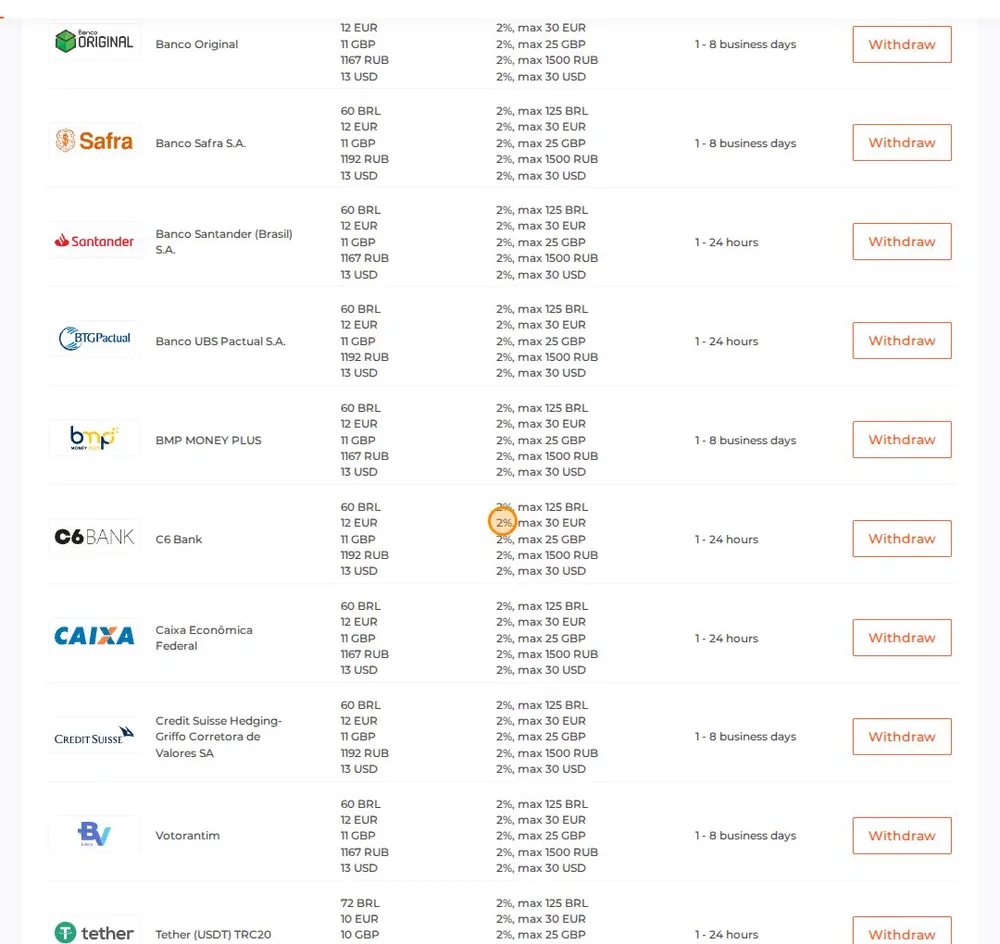
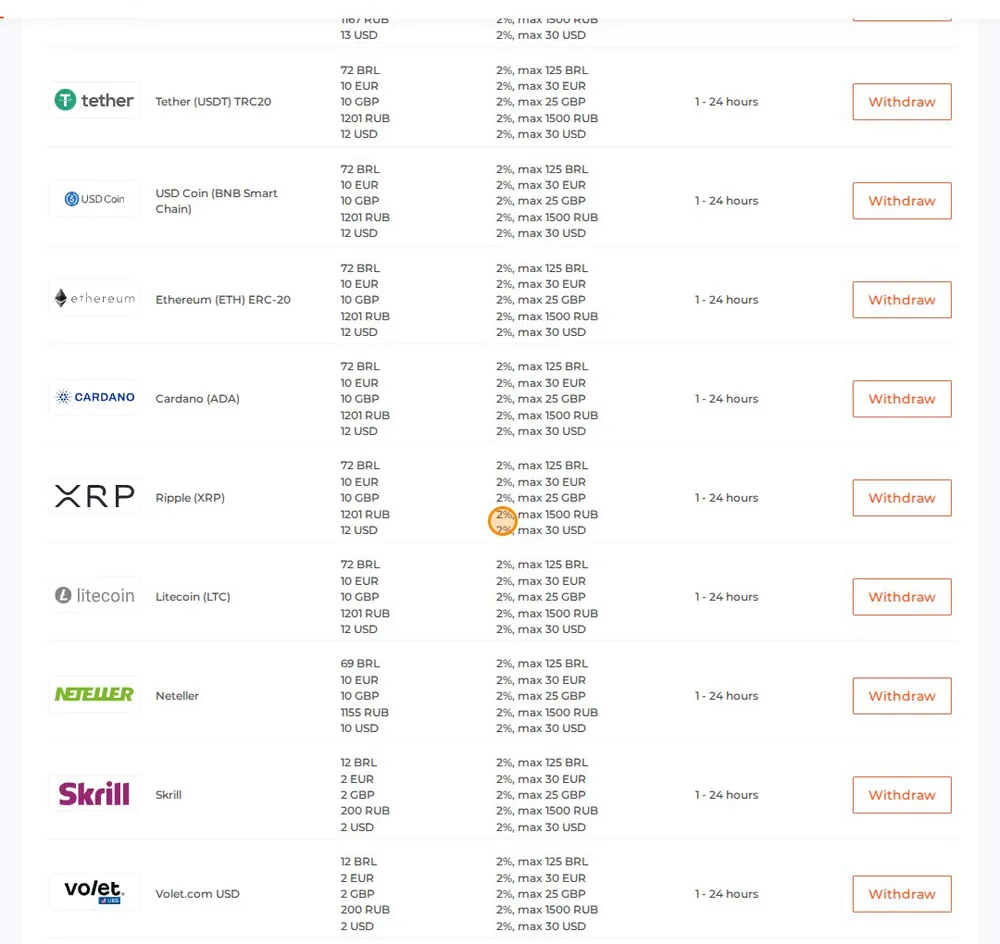
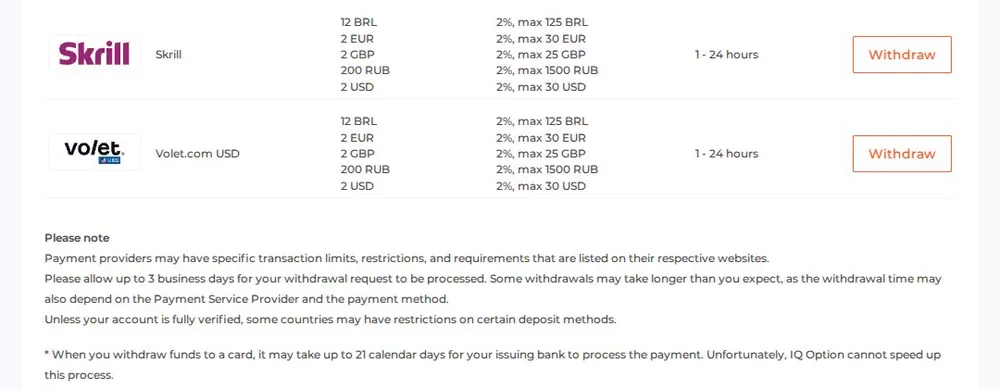
The table does not list PIX as a separate method. In our November 2024 test the bank withdrawal form asked for your CPF, bank details and a PIX key (see the steps below). PIX deposits are available: see how to deposit on IQ Option.
Source: IQ Option’s withdrawal conditions and deposit conditions pages, viewed from our Brazilian account on 4 October 2026.
Recorded by IQ Option Wiki on 4 October 2026 on a new Practice account registered in Brazil, connected through a São Paulo VPN server. We stopped before the Deposit button and paid nothing. Methods, times and bonuses can change; personal data is not shown.
Introduction
Withdrawing money from your IQ Option account in Brazil is a simple process, but knowing the exact steps can save you time and effort. This guide provides step-by-step instructions for both desktop and mobile users.
Quick Reference
| Detail | Information |
|---|---|
| Minimum (official table, Oct 2026) | R$60 by bank transfer; R$12 by card, Skrill or Volet.com; R$69 by Neteller; R$72 in crypto |
| Fee (official table, Oct 2026) | First withdrawal each calendar month free, then 2% (at most R$125) |
| Details needed | CPF, bank account, agency and PIX key |
| Arrival time | Allow up to 3 business days for the request; IQ Option’s table lists 1–24 hours for most Brazilian banks and 1–8 business days for some |
| Other Methods | Varies by bank |
Step 1: Access the Withdrawal Section
- Log in to Your Account: Start by logging in to your IQ Option account.
- Navigate to Your Profile:
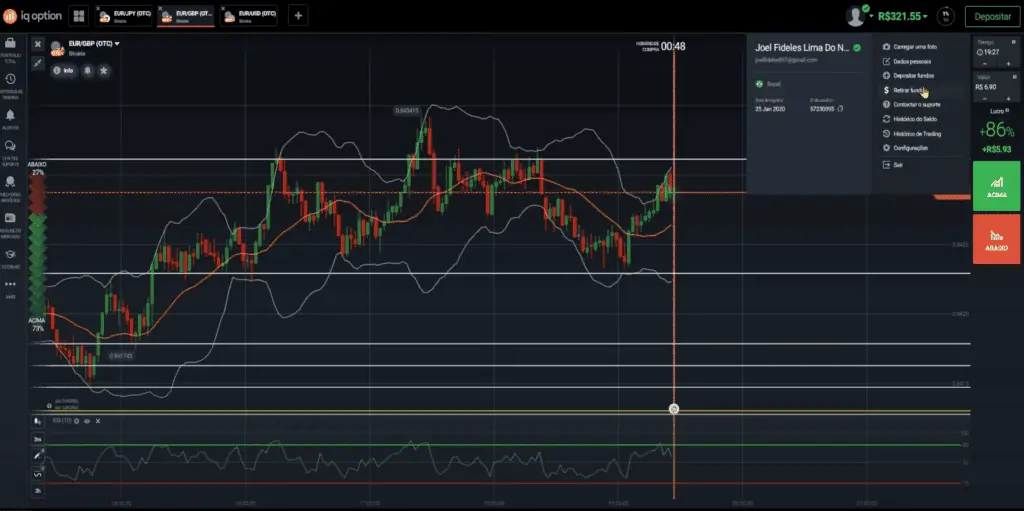
- Click your profile picture or the balance section at the top of the screen.
- Select Withdraw Funds from the dropdown menu.
Step 2: Desktop vs. Mobile Differences
- Desktop: in our November 2024 test the desktop form showed every withdrawal option, including PIX. The October 2026 conditions table lists 18 Brazilian banks; check that yours is among them.
- Mobile: Some options may be limited. If unavailable, switch to the desktop version for a complete range of withdrawal methods.
Step 3: Choose Your Withdrawal Method
Select a withdrawal method that suits you:
- Bank transfer to one of 18 Brazilian banks (from R$60)
- Visa or Mastercard (from R$12)
- E-wallets: Skrill or Volet.com (from R$12), Neteller (from R$69)
- Crypto: six coins, from R$72
In our November 2024 test the form also offered PIX. The October 2026 conditions table does not list it separately, so check the options in your own form.
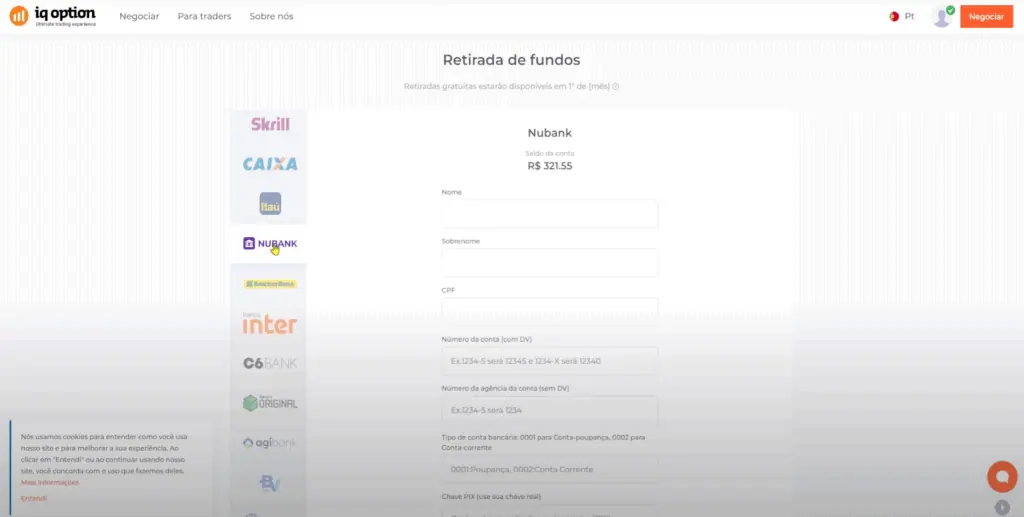
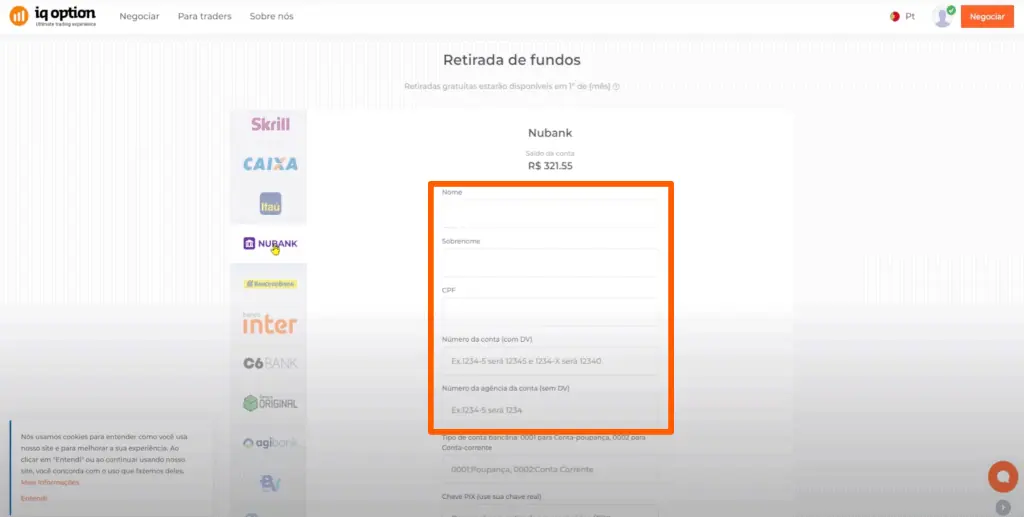
Step 4: Fill Out Your Withdrawal Details
Provide accurate information to avoid delays:
- Enter Personal Information:
- First Name and Last Name (only one surname is required)
- CPF (Brazilian Tax ID)
- Bank Account Information:
- Account Number – Ensure accuracy
- Agency Number – Do not omit any digits
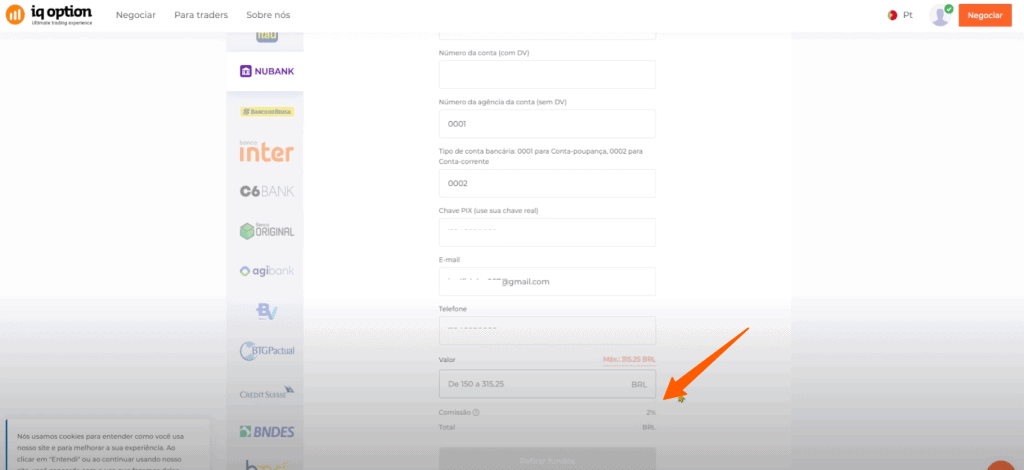
- Account Type – Most digital accounts are Checking Accounts
- PIX Key: If using PIX, input the registered key that matches the account linked to IQ Option.
Step 5: Understand Fees and Limits
- Minimum amount: R$60 by bank transfer, R$12 by card, Skrill or Volet.com, R$69 by Neteller and R$72 in crypto (official table, October 2026). In our November 2024 test the bank form asked for at least R$150, so check the range your own form shows.
- Commission: your first withdrawal each calendar month is free; after that IQ Option charges 2%, at most R$125. The form shows the commission before you confirm, so combine small withdrawals into one.
Step 6: Complete the Withdrawal
- Double-check all details.
- Click Withdraw Funds.
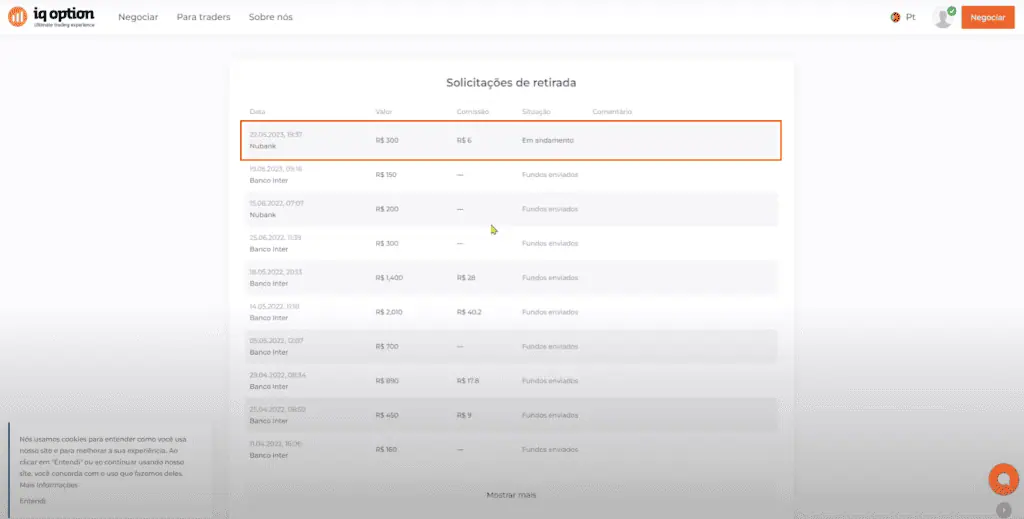
- Wait for processing:
- PIX: the transfer itself settles in seconds once IQ Option has approved your request
- Bank transfers: 1–24 hours at most banks and 1–8 business days at some, according to IQ Option’s table
Tips for a Smooth Withdrawal
- Use the registered email and phone number associated with your IQ Option account
- Verify all bank details to avoid delays
- Check the commission line before you confirm, and combine small withdrawals if a commission applies
- Ensure your account is fully verified before requesting large withdrawals
Conclusion
With these steps, you can withdraw money from your IQ Option account in Brazil confidently and efficiently. PIX is the quickest way for the money to reach your bank once the request is approved, and reading the commission line before you confirm keeps fees down.
📚 Continue Your Trading Education
Build your trading knowledge with our comprehensive guides:
Frequently Asked Questions
Q: What is the minimum withdrawal amount in Brazil?
A: IQ Option’s table lists R$60 for Brazilian banks, R$12 for cards, Skrill and Volet.com, R$69 for Neteller and R$72 for crypto (October 2026). Your own form shows the exact range.
Q: How long does a PIX withdrawal take?
A: A PIX transfer settles in seconds, but only after IQ Option has approved the withdrawal request.
Q: Are there any withdrawal fees?
A: One withdrawal per calendar month is free. After that IQ Option charges 2% per withdrawal, at most R$125; the form shows the commission before you confirm.
Q: Why are some withdrawal options missing on mobile?
A: The mobile app may have limited options. Use the desktop version to access all withdrawal methods including PIX and specific bank transfers.
Q: What information do I need for a withdrawal?
A: You need your full name, CPF (Brazilian Tax ID), bank account number, agency number, and PIX key if using PIX.
Q: How can I avoid withdrawal fees?
A: When the form shows a commission, combine smaller amounts into one withdrawal.