Last updated: 8 October 2026. MoreLess
Every screenshot below was recorded on 5 October 2026 on an IQ Option Practice account registered in Brazil, on an EUR/USD chart. Nothing was paid. The two indicators visible on the charts (Bollinger Bands and Keltner Channels) were added for another test and have nothing to do with the chart type.
The IQ Option platform offers four chart types: Line, Candles, Bars and Heikin-Ashi. You switch between them from one menu at the bottom left of the chart, and the prices stay the same; only the way they are drawn changes. Below is where the menu is, what each type looks like on the current platform and how to read it.
Quick answer
- Four types: Line, Candles, Bars and Heikin-Ashi.
- Where: the first button in the tool column at the bottom left of the chart opens CHART TYPE.
- Display Settings: each type has its own settings, such as colours, and the menu has a “Full-width current price line” checkbox.
- Candle size is separate: the second button sets the candle time period (5 seconds to 1 month); the type only changes how the same prices are drawn.
- Which is best: there is no official answer. Try each one on the Practice account.
How to find IQ Option charts
Click the first button in the tool column at the bottom left of the chart (1). It shows an icon of the chart type in use. CHART TYPE opens with the four types (2): Line, Candles, Bars and Heikin-Ashi. To the right are the “Display Settings” (3) of the selected type, with previews and colour pickers, and at the top a checkbox (4) called “Full-width current price line”, ticked on our account.
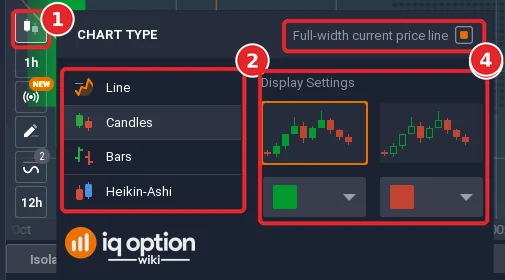
The second button in the tool column (it showed 1h or 2m for us) is a different setting: the candle time period. Its menu says it is the “Price range for a specific time interval, used for both candlesticks and bars”. See our time frames guide for it.
IQ Option Line Chart
Step 2: Choose Line
Click the chart type button (1) and choose Line. The chart becomes one line (2) that follows the price. It is the simplest view: you see where the price went, not the highs and lows inside each period. Display Settings for Line offer two preview styles, a colour box (white on ours) and a line-style box.
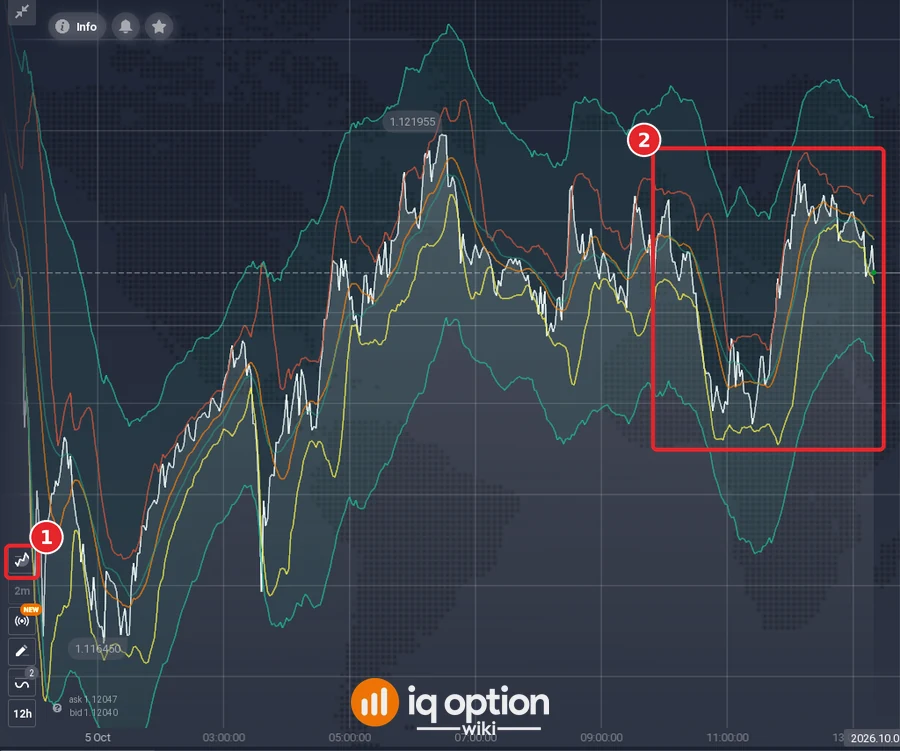
A line is quick to read for the overall direction and for levels where the price turned before. It leaves out the open, high and low of each period.
IQ Option Japanese Candle chart
Step 3: Choose Candles
Choose Candles from the same menu (1). Each candle covers one period (1h in our screenshot) and has four prices: open, close, high and low. The body spans open to close and the thin lines (wicks) reach the high and low. By default a rising candle is green (2) and a falling one red (3). The two colour pickers in Display Settings let you change them, and there are two preview styles to choose from.
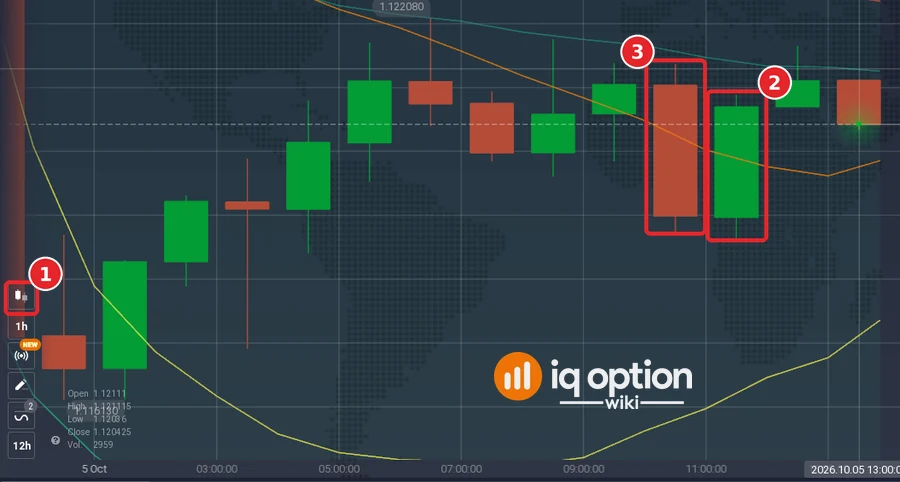
Candles show who moved the price within each period, which is why many traders use them for price action and with indicators.
IQ Option Heikin-Ashi chart
Step 4: Choose Heikin-Ashi
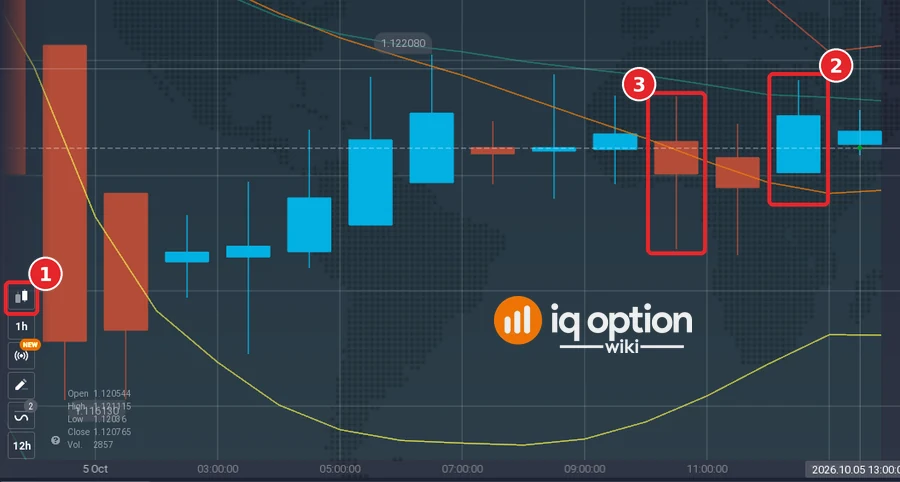
Choose Heikin-Ashi (1). It looks like candles, but by default the rising candles are blue (2) and the falling ones red (3), and you can change both in Display Settings. In general, Heikin-Ashi candles are calculated from averaged prices rather than the raw open, high, low and close, so a sequence of candles looks smoother and runs in longer runs of one colour. The price of a Heikin-Ashi candle is therefore not the price that was traded: use a normal candle or the order panel for the exact price.
IQ Option Bar Chart
Step 5: Choose Bars
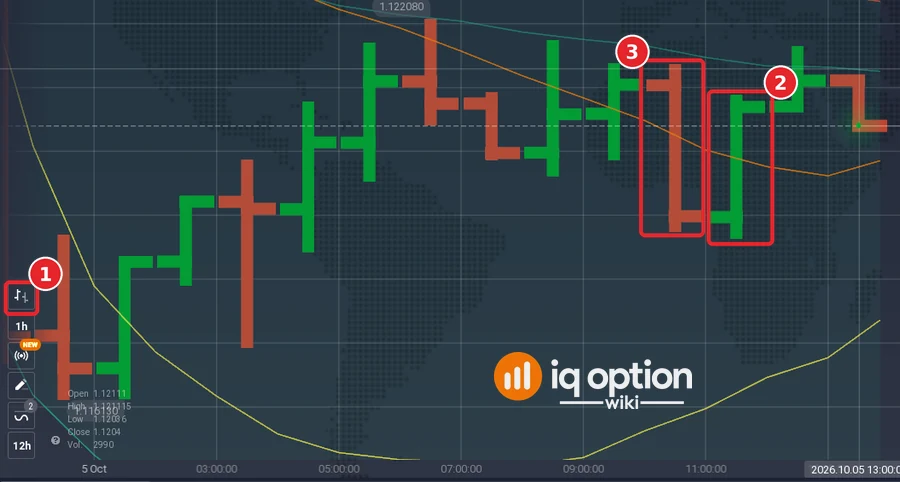
Choose Bars (1). Each bar is a vertical line from the period’s low to its high. The short tick on the left is the open and the one on the right is the close. A rising bar is green (2) and a falling one red (3) by default. The Bars menu has only the two colour pickers, with no preview styles. When we selected Bars, the platform showed the same candle time period as before; the bars are the candles redrawn.
Pros and Cons of IQ Option Chart Types
| Chart type | Shows | Points to keep in mind |
|---|---|---|
| Line | The path of the price | No open, high or low of each period |
| Candles | Open, close, high and low in colour | Needs a little practice to read the wicks |
| Bars | Open, close, high and low as ticks | Less visual than candles |
| Heikin-Ashi | Averaged candles, smoother trend | Prices are calculated, not the traded prices |
How do you choose the chart to trade with on IQ Option?
IQ Option does not recommend a type. The choice is personal and depends on what you want to see: direction only (Line), or the detail of each period (Candles and Bars), or a smoother trend picture (Heikin-Ashi). Try each on the Practice account, with the same asset and candle size, and keep the one you can read fastest. A chart type does not change the market or improve results by itself.
Which type of IQ Option chart is best?
None is best for everyone. Candles are the usual starting point because they show the open, close, high and low and work with all indicators; Line is easier for beginners; Heikin-Ashi is a trend view that hides some price detail. The chart templates guide shows how to save an indicator setup, and the chart grids guide how to show several charts, each with its own type, at once.
Frequently Asked Questions
Q: What chart types does IQ Option have?
A: Four: Line, Candles, Bars and Heikin-Ashi, as listed in the CHART TYPE menu on 5 October 2026.
Q: Where do I change the chart type?
A: Click the first button in the tool column at the bottom left of the chart.
Q: Can I change the colours?
A: Yes. Display Settings has colour pickers for each type: a rising and a falling colour for Candles, Bars and Heikin-Ashi, and a line colour for Line.
Q: What is the “Full-width current price line” option?
A: A checkbox at the top of the CHART TYPE menu. It was ticked on our account, and the current price line ran across the whole chart.
Q: Is the chart type the same as the time frame?
A: No. The type is how the prices are drawn; the candle time period and the chart’s visible range are separate buttons.
Q: Which chart type is best for beginners?
A: IQ Option does not say. A line is the simplest to read; candles show more detail. Practise on a Practice account first.